
A pet feeder video storage comparison should start with the real reason owners want video: proof. Did food actually drop? Did the right pet eat it? Did another cat steal the meal? Did the bowl jam? Did the feeder go offline? Video storage is not just a tech feature. It decides whether the owner can review what happened after the meal window has passed.
For homes that need visual meal checks, a smart WiFi pet feeder with camera can help verify feeding events. But the camera is only half the system. The storage method decides whether the footage is available later, how much it costs, how private it is, and whether the owner can trust it during work, sleep, or travel.
Direct Answer: Pet Feeder Video Storage Comparison
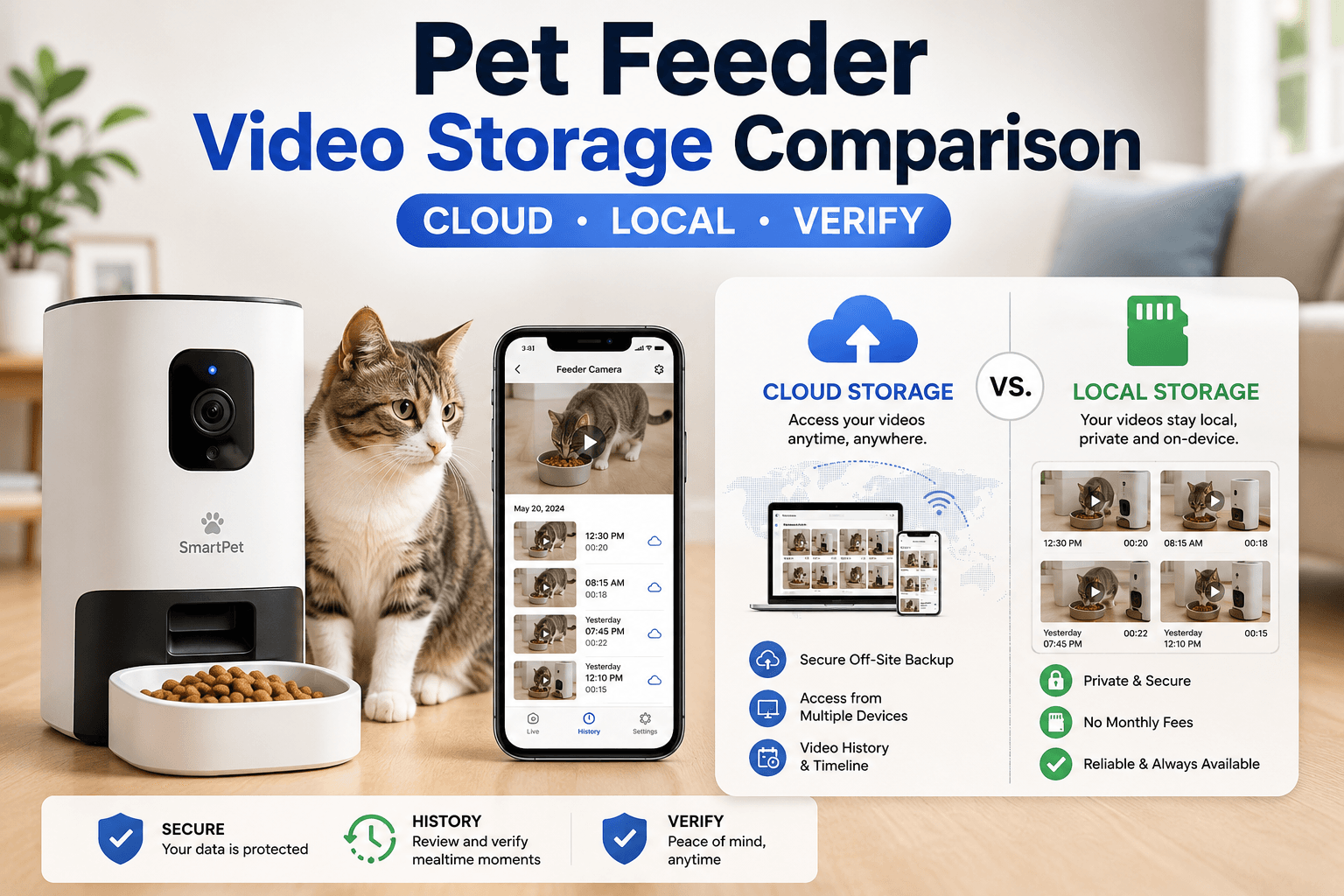
A pet feeder video storage comparison should compare cloud storage, local SD card storage, event-only clips, live-view-only cameras, app snapshots, subscription cost, privacy controls, encryption, retention length, WiFi stability, and whether the footage actually shows the bowl during meals. Cloud storage is usually better for remote access and backup. Local storage is usually better for lower ongoing cost and more direct control. Event clips save space but may miss context. Live-view-only systems are useful for quick checks but weak for reviewing missed meals.
The best choice depends on the job. If the owner travels and needs remote review, cloud storage may be useful. If the owner wants lower cost and less cloud dependency, local storage may fit better. If the goal is only to check lunch from work, live view may be enough. A serious pet feeder video storage comparison should match storage to feeding risk, not marketing language.
Why This Happens
Pet feeder cameras create a new question: what happens to the footage? Some feeders show only live video. Some save short motion clips. Some save meal-triggered clips. Some use cloud storage through the app. Some use local storage through a memory card. Some combine several methods.
The FTC’s guidance on securing internet-connected devices at home recommends keeping connected devices updated and using available security features. That matters because a camera feeder can capture household audio, room layout, routines, pets, and sometimes people moving through the frame.
A pet feeder video storage comparison therefore has to cover more than convenience. It should compare verification value, storage access, privacy exposure, account security, subscription dependency, and what happens when the feeder loses WiFi.
What To Do First
Start by deciding what the video must prove. If the owner only wants to see whether the pet is near the bowl, live view may be enough. If the owner needs to confirm whether breakfast dispensed while asleep, recorded clips matter. If one pet steals from another, the camera must capture enough before and after the meal to identify the thief.
Next, check camera angle. Storage is useless if the camera does not show the food outlet, bowl surface, and pet’s face or body clearly. A long storage plan with a bad camera angle only saves bad evidence.
Use WiFi pet feeder with camera before judging storage. A pet feeder video storage comparison works only when camera placement, lighting, WiFi, and meal timing are already stable.
The Feeding Loop Behind Video Storage Problems
The loop starts when the owner receives an app alert or wonders whether the pet ate. The owner opens the camera too late and sees only an empty bowl. Without saved footage, the owner does not know whether the feeder dispensed, whether the pet ate, whether another pet stole food, or whether the bowl was already empty before the meal.
Then the owner feeds manually “just in case.” Later, the scheduled meal runs again or the pet had already eaten. The result is duplicate feeding and poor routine control.
A better pet feeder video storage comparison chooses storage that matches the risk. If missed-meal uncertainty is common, event or meal clips are more useful than live view alone. If overfeeding from uncertainty is the problem, reviewable evidence matters.
The Emotional Trigger Owners Miss
The emotional trigger is remote worry. Owners want to see the pet while away because it feels reassuring. But reassurance is not the same as evidence. A quick live view can reduce anxiety for a moment while still failing to answer what happened during the actual feeding event.
Video storage should reduce guessing. If it only makes the owner check the app repeatedly, it becomes another anxiety tool. The goal is to review the meal once, confirm the facts, and return to the schedule.
Use app controlled pet feeder benefits to keep app use disciplined. Video should support feeding control, not create constant manual feeding decisions.
The Addiction Mechanism
The addiction mechanism is camera-triggered feeding. If the owner opens a stored clip, sees the pet near the feeder, and sends manual food every time, the camera becomes a remote snack button. The pet may learn to wait near the feeder because camera visibility leads to food.
Storage makes this stronger because the owner can review more moments and find more reasons to feed. The problem is not storage itself. The problem is using footage emotionally instead of operationally.
A controlled pet feeder video storage comparison should favor systems that help verify meals, not systems that encourage constant intervention. Manual feed should be measured, logged, and rare.
Comparison Table: Video Storage Types
| Storage Type | Best For | Main Weak Point | Best Owner Fit |
|---|---|---|---|
| Live view only | Quick real-time bowl checks | No review after the moment passes | Owners who are usually available at meal time |
| Cloud storage | Remote review and backup clips | Subscription cost and account privacy | Travelers and owners who need off-site access |
| Local SD card storage | Lower ongoing cost and local control | Card failure, theft, or limited remote access | Owners who check footage at home |
| Event-only clips | Saving space and finding activity fast | May miss context before or after meals | Owners focused on alerts and short evidence |
| Meal-triggered clips | Feeding verification | Weak if the trigger fails or camera angle is poor | Owners who need proof of dispense and eating |
This pet feeder video storage comparison shows why the best storage method depends on the feeding problem. More storage is not always better. Better evidence is better.
Cloud Storage
Cloud storage saves video clips or recordings to the provider’s servers. The owner can usually review footage through the app from work, travel, or another room. This is useful when the owner needs access away from home or wants footage available even if the feeder is damaged or unplugged after the clip uploads.
The tradeoff is account dependency. Cloud storage may require a subscription, internet access, app login, and trust in the provider’s security practices. If the subscription ends, storage length or access may change. If the account is weakly protected, the camera becomes a privacy risk.
The NIST Cybersecurity for IoT Program focuses on improving cybersecurity for connected products and IoT environments. For a pet feeder camera, the practical takeaway is clear: storage convenience should be judged with security and privacy, not only clip length.
Local SD Card Storage
Local storage usually means footage is saved on a memory card inside the feeder or camera unit. This can reduce subscription cost and keep footage closer to the owner’s control. It can work well for owners who mostly review video at home or do not need long cloud retention.
The weakness is physical dependency. If the card fails, fills up, corrupts, or is removed, footage may be lost. If the feeder is knocked over or damaged, stored footage may disappear with it. Some local systems also offer weaker remote access than cloud systems.
A pet feeder video storage comparison should treat local storage as controlled but not automatic. Owners still need to check card health, overwrite settings, capacity, file access, and whether the app clearly shows when recording stops.
Event-Only Clips
Event-only clips save video when motion, sound, feeding, or another trigger occurs. This saves storage space and makes it easier to find relevant footage. For pet feeders, event clips are useful when the goal is to catch bowl visits, feeder attacks, food stealing, or meal delivery.
The weakness is missed context. If the trigger starts late, the clip may show the pet leaving but not eating. If the trigger sensitivity is low, the feeder may miss a quiet cat. If sensitivity is high, the app may fill with useless clips from shadows, people walking by, or room movement.
Use cat proof smart pet feeder hacks when event clips show pawing, tipping, chute fishing, or lid attacks. Storage helps only if the owner uses footage to fix the station.
Meal-Triggered Clips
Meal-triggered clips are often the most useful for feeder verification. The camera records when the feeder dispenses or when the schedule runs. That gives the owner a focused record of the moment that matters most.
The weakness is trigger dependency. If the feeder logs a dispense but food is jammed, the clip must show the chute and bowl clearly enough to reveal the problem. If the camera angle is too high or too narrow, the clip may prove that the feeder made a sound but not that food reached the bowl.
A strong pet feeder video storage comparison should rank meal-triggered clips highly when the owner cares about feeding proof. But clip timing and camera angle must be tested before travel or long workdays.
Live View Only
Live view is useful for quick checks. The owner can open the app and see the pet, bowl, or feeder station in real time. This is enough for simple reassurance when the owner is available near meal time.
The weakness is that live view does not preserve the past. If the owner opens the app an hour late, the evidence may be gone. The bowl may be empty, but that does not prove who ate, when they ate, or whether the feeder dispensed correctly.
Live view is the weakest option in a pet feeder video storage comparison when the owner needs proof after the fact. It is a viewing feature, not a storage feature.
Privacy and Security Controls
A pet feeder camera should be treated like an indoor camera. It can capture routines, voices, room layout, feeding times, and people passing through the frame. The camera should point at the bowl, not private areas of the home.
The FTC’s home Wi-Fi security guidance recommends using WPA3 or WPA2 encryption for home networks. For camera feeders, network security matters because video storage and app access depend on the home network.
Use smart device security. A pet feeder video storage comparison should include password strength, app sharing, firmware updates, account recovery, and whether the camera can be disabled or repositioned when needed.
Subscription Cost
Cloud storage often comes with subscription tiers. The difference may include clip length, storage duration, number of devices, smart detection, download access, or continuous recording. Owners should compare the monthly cost against the real feeding problem.
If the owner only needs occasional live checks, a subscription may be unnecessary. If the owner travels often and needs seven-day review, cloud storage may be worth the cost. If the household already pays for too many apps, local storage may be more practical.
A useful pet feeder video storage comparison should calculate annual cost, not only monthly cost. A small monthly fee becomes part of the feeder’s real price.
Retention Length
Retention length means how long footage stays available. Some systems keep clips for a few hours, some for days, and some longer. Longer retention is not always necessary, but too-short retention can fail when the owner needs to review a missed meal after work or travel.
For feeding, the most important window is usually the time between meal event and owner review. A shift worker may need clips available for twelve hours. A traveler may need several days. A homebody may need only same-day clips.
The best retention length in a pet feeder video storage comparison is the shortest one that still supports reliable meal verification. Longer storage increases cost, data exposure, or management burden if the owner never uses it.
WiFi Stability and Upload Risk
Cloud storage depends on upload stability. If the feeder loses WiFi during a meal, the clip may fail to upload or may upload late. Local storage may continue recording during internet loss if the device remains powered and the local card works.
Camera feeders need stronger WiFi than simple app-controlled feeders because video uses more bandwidth. Weak mesh nodes, far router placement, thick walls, appliances, and crowded networks can create frozen video or missing clips.
Use pet feeder WiFi connection and mesh network smart pet feeder connection. A pet feeder video storage comparison is incomplete if it ignores upload reliability.
Power Failure and Recording
Video storage cannot help if the feeder loses power before recording. Some battery backup systems may keep feeding functions active but not support full camera recording. Others may stop video features to preserve power.
Check what the feeder does during wall-power loss. Does it still dispense? Does it still record? Does the app show offline? Does local storage continue? Does cloud upload pause? These details decide whether video storage helps during real disruptions.
Use pet feeder with battery backup and automatic pet feeder battery light blinking. Storage reliability depends on power reliability.
Video Quality: Enough Detail, Not Just HD Claims
Video quality should be judged by feeding evidence. Can the owner see the food outlet? Can the owner see food in the bowl? Can the owner identify which pet ate? Can the owner see low light or nighttime meals? Can the camera handle glare from windows or reflective bowls?
Resolution matters, but angle and lighting matter more. A high-resolution camera pointed too high may miss the bowl. A lower-resolution camera placed correctly may produce better feeding evidence.
A practical pet feeder video storage comparison should include test clips from actual meal times, not only daytime app previews.
Audio Storage
Some camera feeders include audio, voice recording, or two-way sound. Audio may help identify barking, meowing, feeder noises, or owner voice cues. It also increases privacy sensitivity because household conversations may be captured.
If audio is stored, check whether it can be disabled, whether clips include sound by default, and who can access recordings. A bowl-view camera does not need to record private conversations to verify a meal.
Use pet feeder voice recorder troubleshooting if audio cues fail. Audio should support the feeding routine, not expose more of the home than necessary.
Multi-Pet Homes
Video storage is especially useful in multi-pet homes because the bowl result can be misleading. The feeder may dispense correctly, but the wrong pet may eat the meal. Without footage, the owner may assume the assigned pet ate.
For multi-pet homes, the camera should capture approach direction, bowl access, and enough body detail to identify the animal. Event clips should begin early enough to show who arrived first.
Use microchip pet feeder review when video proves food stealing. A pet feeder video storage comparison can identify the problem, but access control may be needed to fix it.
Cleaning and Storage Evidence
Video can reveal food left in the bowl, ants, pet refusal, bowl tipping, or chute problems. It cannot clean the feeder. Owners still need regular maintenance because stored clips do not prevent residue, stale kibble, or jams.
The FDA’s safe handling tips for pet food and treats emphasize clean bowls, utensils, and food-contact surfaces. A camera feeder remains a food-contact device even when its video system is working perfectly.
Use clean smart pet feeder and pet feeder maintenance. Video storage proves what happened; cleaning prevents many problems from happening.
Common Failure Pattern
The most common failure pattern is paying for storage without testing whether clips show the bowl. The owner later opens the footage and sees only the pet’s back, the floor, or a dark corner. The storage worked, but the evidence failed.
The second failure is relying on cloud storage with weak WiFi. The owner expects remote proof, but clips are missing because upload failed during the meal event.
The third failure is treating footage as a reason to feed. If every video check leads to extra food, video storage becomes a tool for overfeeding instead of verification.
Real-World Impact
The real-world impact of the right video storage is clear feeding evidence. The owner can review the meal, confirm food delivery, identify the eating pet, spot feeder manipulation, and avoid panic feeding. This is especially useful during travel, shift work, early mornings, and multi-pet routines.
The impact of the wrong storage choice is frustration: missing clips, subscription regret, privacy worry, poor camera angle, false confidence, and manual feeding without evidence. Storage should make the feeding routine clearer, not more complicated.
For connected feeding options, compare the smart feeders collection. Choose based on meal verification, app reliability, power backup, cleaning access, camera angle, and whether video storage actually solves the owner’s problem.
Can This Be Fixed?
Yes, weak feeder video storage setups can be fixed with a full verification reset. Reposition the camera. Test meal clips. Check cloud or local storage settings. Confirm retention length. Secure the app account. Test WiFi at the feeder location. Check power backup. Review one full scheduled meal before relying on storage during travel or work.
Run a seven-day video storage check. Record whether clips saved, whether the bowl was visible, whether the pet was identifiable, whether audio was stored, whether WiFi dropped, whether cloud upload delayed, and whether footage changed any feeding decision. If storage does not help the owner make better feeding decisions, simplify the setup.
Cat owners can compare the cat feeders collection when small portions and multi-cat access matter. Dog owners can compare the dog feeders collection when feeder stability, bowl size, and camera angle require more space.
Who Should Walk Away and Who Should Use This
Walk away from paying for video storage if the camera angle does not show the bowl, the WiFi cannot upload clips, the owner will not secure the account, or live view already solves the household’s problem. Also walk away from storing more video than needed if privacy is a major concern.
Use a pet feeder video storage comparison if you need proof of meals, travel review, multi-pet monitoring, food stealing evidence, feeder jam confirmation, bowl checks, or a record of early-morning feeding. It is especially useful for camera feeders, app-controlled feeders, multi-pet homes, shift workers, and owners who overfeed when they are uncertain.
For regular daily feeding, a 2L smart pet feeder for regular feeding may be enough when video proof is not required. The right choice depends on whether the owner needs timing control, visual evidence, or both.
Mini FAQ
What is the best pet feeder video storage option?
The best pet feeder video storage option depends on the need. Cloud storage is best for remote review, local storage is best for lower ongoing cost and control, event clips save space, and live view is best only for real-time checks.
Is cloud storage better than local storage?
Cloud storage is better for remote access and off-device backup, while local storage is better for avoiding subscription costs and keeping footage closer to the owner’s control. Both need security and testing.
Do I need video storage on a pet feeder camera?
You need video storage if you want to review meals after they happen, confirm food stealing, check missed meals, or verify feeding while away. Live view may be enough for simple real-time checks.
Can video storage prove my pet ate?
Video storage can help prove your pet ate if the camera clearly shows the bowl and the pet during the meal. Poor camera angle, bad lighting, or short clips can still leave uncertainty.
Is pet feeder video storage safe for privacy?
Pet feeder video storage is safer when the camera points only at the bowl, the app uses strong account protection, firmware stays updated, sharing is limited, and unnecessary audio or long retention is avoided.
What is the biggest mistake in pet feeder video storage comparison?
The biggest mistake is comparing storage length before testing evidence quality. A long clip is not useful if it does not show the food outlet, bowl, and pet clearly during the actual meal.
The best pet feeder video storage comparison is not about saving the most footage. It is about saving the right proof. Cloud, local, event clips, meal clips, and live view each solve different problems. Choose the storage method that verifies meals clearly, protects privacy, fits the budget, and stops uncertainty from turning into extra food.