
Pet feeder calibration is the step most owners skip after buying an automatic feeder. The app says “one portion,” the machine drops food, and the routine looks controlled. The problem is that one portion is not always the amount the owner thinks it is. Kibble size, shape, density, chute design, motor timing, bowl angle, and food dust can all change how much food actually lands in the bowl.
For daily dry-food routines, a smart automatic pet feeder with app control works best when the owner tests the real output before trusting the schedule. The feeder controls timing, but pet feeder calibration controls accuracy.
Direct Answer: Pet Feeder Calibration
Pet feeder calibration means testing how much food your automatic feeder actually dispenses per portion, then adjusting the app schedule or serving count so the pet receives the correct daily amount. The right method is simple: weigh several test portions, calculate the average, compare it with the pet’s planned daily food amount, then program meals based on real grams instead of assumed scoops.
A feeder that is not calibrated can overfeed or underfeed quietly. One extra gram per portion looks small. Across several meals per day, several weeks, and multiple pets, that error becomes weight drift, begging, missed intake, or owner confusion. A strong pet feeder calibration routine turns the feeder from a convenient dispenser into a measurable feeding system.
Why Feeder Portions Drift
Automatic feeders dispense food mechanically. They do not understand calories, body condition, or the difference between small round kibble and large flat kibble. A portion setting is usually a mechanical output, not a nutrition guarantee. If the kibble changes, the real amount per portion changes too.
The AAFCO pet food label guidance explains that feeding directions are part of pet food labeling, but those directions still have to be converted into the owner’s real feeding method. If the feeder portion is inaccurate, the label direction and the actual bowl amount stop matching.
Pet feeder calibration is also affected by cleanliness. Kibble dust collects in the food path. Oils build on the chute. Moisture makes pieces stick. A dispenser that was accurate when new can become inconsistent after weeks of refilling without cleaning. Calibration and maintenance belong together.
What To Do First
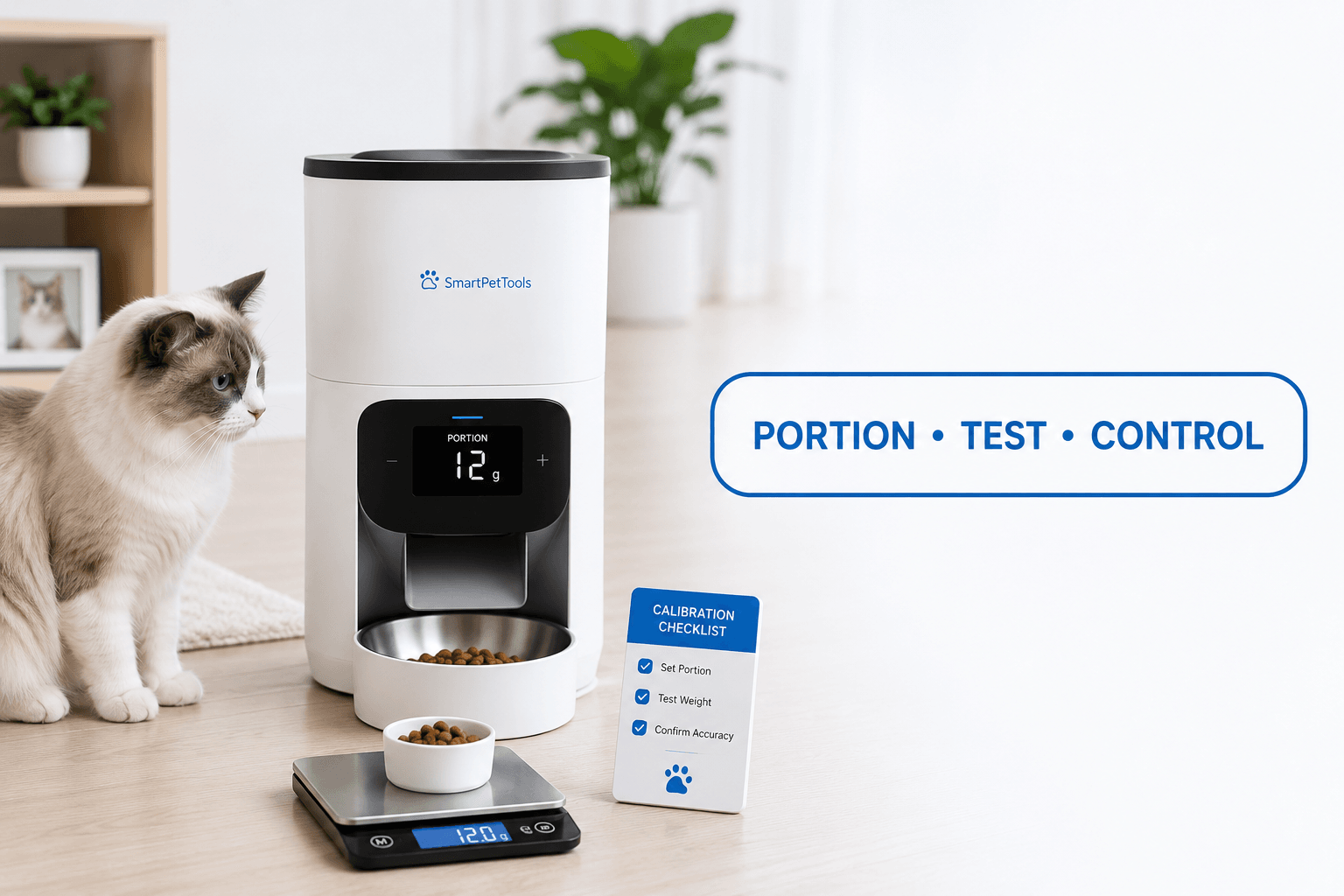
Start with a digital kitchen scale. Do not calibrate by eye. Do not rely on a cup mark alone. Put an empty bowl on the scale, tare it to zero, then run one feeder portion. Record the weight. Repeat this test at least five times and calculate the average.
A practical pet feeder calibration test should answer three questions: how many grams one portion dispenses, how consistent each portion is, and how many portions the pet needs per day. If one portion averages 6 grams and the pet’s daily dry-food target is 48 grams, the feeder schedule should deliver 8 total portions across the day.
Before programming the full routine, use how to use a smart pet feeder to confirm app setup, meal timing, portion testing, and schedule checks. Setup without calibration is only partial setup.
The Calibration Loop Behind Feeding Errors
The calibration loop starts when the owner trusts the factory portion setting. The feeder runs on time, so the owner assumes the food amount is correct. The pet slowly gains weight, begs more often, or leaves food behind. The owner then changes the schedule without knowing the real output.
That loop creates bad data. The owner cannot tell whether the pet is eating too much, the feeder is dispensing too much, another pet is stealing food, or the food itself changed. The routine looks automated, but the measurement layer is missing.
A proper pet feeder calibration reset breaks the loop. The owner measures the output first, then changes the schedule. If the pet’s weight changes later, the owner can adjust with real numbers instead of guessing from bowl appearance.
The Emotional Trigger Owners Miss
The emotional trigger is false confidence. A smart feeder feels precise because it has an app, schedule, motor, and portion button. Owners assume technology means accuracy. That assumption creates quiet errors because the device can be consistent without being correct.
A feeder can dispense perfectly on schedule and still deliver the wrong amount. A feeder can show the right meal count and still be overfeeding because the kibble is dense. A feeder can look empty after meals and still be giving too much if the pet eats fast.
Good pet feeder calibration separates automation from accuracy. Automation answers “when does food appear?” Calibration answers “how much food actually appeared?” Both answers matter.
The Addiction Mechanism
The addiction mechanism is adjustment by begging. When owners do not know the real feeder output, they often use pet behavior as the measuring tool. If the pet begs, they add portions. If the bowl looks empty, they add another meal. If the pet wakes early, they shift breakfast forward and add food.
This turns the pet into the calibration system, which is a weak strategy. Begging is not a precise nutrition signal. It can come from habit, boredom, food theft, fast eating, schedule pressure, or learned reward behavior.
A calibrated feeder prevents this. With pet feeder calibration, the owner knows the daily output and can respond to begging with routine control instead of extra food. For cats that pressure owners after meals, why a cat is always hungry after eating explains why demand behavior should not automatically control food volume.
How To Calibrate a Pet Feeder
Use this process whenever the feeder is new, the food changes, the feeder is cleaned, the app is reset, or the pet’s weight plan changes. Empty old kibble first. Refill with the exact food the pet will eat. Place the bowl on a scale. Run one portion. Record the weight. Repeat five to ten times. Use the average, not the best-looking result.
Then build the schedule from the daily target. If the pet needs 60 grams per day and one feeder portion averages 5 grams, the day needs 12 portions total. Those portions can be divided across two, three, four, or more meals as long as the daily total stays correct.
A strong pet feeder calibration test also checks consistency. If one portion drops 3 grams, the next drops 8 grams, and the next drops 5 grams, the feeder path needs inspection. Kibble shape, chute dust, tank loading, and moisture can all create uneven output.
Kibble Size and Food Changes
Kibble size is one of the main reasons calibration changes. Small round kibble flows differently from large flat pieces. Lightweight food takes up more volume per gram. Dense food delivers more calories in the same-looking portion. A feeder cannot correct those differences unless the owner measures them.
The FDA safe handling guidance for pet food and treats emphasizes proper storage and clean handling. Storage also affects calibration because moisture, stale food, and dust can change how kibble moves through the feeder.
Repeat pet feeder calibration after every food change. Do not assume the old portion count still works. A new formula can look similar and weigh differently. The schedule should follow the food in the feeder, not the habit from the previous bag.
Cleaning Before Calibration
Calibration should happen after cleaning, not before. If the chute is dirty, the test may measure a feeder that is already failing. Empty the tank, remove loose kibble dust, wash removable parts, dry everything completely, then run the test portions.
For the full cleaning routine, use clean smart pet feeder. A dirty feeder can make portions inconsistent, create odor, attract ants, and increase jam risk.
A clean feeder gives better calibration data. A damp feeder gives bad data. A chute with old crumbs gives bad data. A bowl sitting at an angle gives bad data. Pet feeder calibration should be done on a level surface with a dry, assembled feeder and the correct kibble.
Weight Control and Portion Accuracy
For pets on a weight-control routine, calibration is not optional. Small portion errors can block progress. If a feeder dispenses more than expected, the owner may think the pet is failing the plan when the real problem is hidden overfeeding.
The AVMA healthy pet weight guidance explains why body condition matters for long-term health. A calibrated feeder helps protect that condition because the owner can manage daily food with measurable numbers.
For weight routines, connect pet feeder calibration with automatic feeder for weight loss. The feeder should divide the daily amount accurately, not simply dispense food more often.
Smart App Settings and Offline Risk
Smart feeders can lose settings after resets, app changes, router problems, or device re-pairing. After any reset, confirm the portion size again. Do not assume the old schedule survived. A feeder that reconnects with default portion settings can quietly change the daily food amount.
For connection problems, use smart pet feeder offline. Offline troubleshooting should protect the feeding schedule without creating bonus meals.
A strong pet feeder calibration routine includes app verification. Check meal count, portion count, time zone, daylight saving settings, manual feeding history, and whether another household member changed the schedule.
Common Failure Pattern
The common failure pattern is using the feeder’s “portion” as if it were a universal measurement. The owner programs four portions per day without knowing whether one portion is 4 grams, 8 grams, or 12 grams. The pet’s intake then depends on mechanical guesswork.
The second failure is calibrating once and never checking again. Food changes, feeder wear, dust, cleaning, and app resets can all change output. Calibration should be repeated at routine checkpoints.
The third failure is ignoring multi-pet access. The feeder may dispense the correct amount, but the wrong pet may eat it. For shared homes, use how to stop one cat from eating the other’s food before blaming the feeder settings.
Real-World Impact
The real-world impact of poor pet feeder calibration is slow and easy to miss. A cat gains weight even though the owner “feeds only what the app says.” A dog begs because portions are smaller than expected. A multi-pet home misreads theft as hunger. A feeder schedule looks clean while the actual food amount is wrong.
Good calibration creates cleaner decisions. If the pet gains weight, the owner can reduce measured output. If the pet loses condition, the owner can increase planned food. If begging continues despite correct portions, the owner can inspect behavior, meal spacing, speed, and stealing instead of guessing.
For camera-based verification, WiFi pet feeder with camera can help confirm whether the right pet actually ate the calibrated meal.
Can This Be Fixed?
Yes, feeder portion errors can be fixed with a full pet feeder calibration reset. Clean the feeder, refill with the current kibble, weigh repeated portions, calculate the average, rebuild the schedule, and test the next few meals. Do not change the food, schedule, and device settings all at once without measuring output.
Run a seven-day calibration check. Record food dispensed, food eaten, leftovers, begging, pet weight trend, stool quality, and feeder errors. If the feeder output varies too much, inspect kibble size, tank loading, chute cleanliness, power stability, and bowl alignment.
For feeder selection, start with the smart feeders collection. Cat owners can compare the cat feeders collection, while dog owners should use the dog feeders collection when portion volume and kibble size are larger concerns.
Who Should Walk Away and Who Should Use This
Walk away from trusting a feeder portion number without weighing it. Also walk away from changing food without recalibrating, topping up old kibble without cleaning, and solving every hunger signal by adding portions.
Use pet feeder calibration if your pet is gaining weight, losing condition, begging after scheduled meals, leaving food behind, switching foods, using a new feeder, recovering from app reset, or sharing a home with other pets. Calibration is especially important for weight-control routines, shift-worker feeding, early-morning cat feeding, and multi-pet homes.
A timed slow feed automatic feeder helps when portion accuracy and eating speed both matter. The final rule is direct: pet feeder calibration turns automatic feeding from a timed habit into a measurable routine.
Mini FAQ
What is pet feeder calibration?
Pet feeder calibration is the process of measuring how much food an automatic feeder actually dispenses per portion. Weigh several test portions, calculate the average, then program meals based on real grams instead of app assumptions.
How often should I calibrate a pet feeder?
Calibrate a pet feeder when it is new, after changing food, after cleaning, after an app reset, after a jam, or when the pet’s weight changes unexpectedly. Routine checks prevent slow portion drift.
Can kibble size affect feeder calibration?
Kibble size strongly affects feeder calibration. Small, round, large, flat, dense, or lightweight foods move differently through the dispenser. Recalibrate every time the food formula or kibble shape changes.
Do I need a scale for pet feeder calibration?
A digital kitchen scale is the best tool for pet feeder calibration. Cups and visual estimates are less accurate because different kibble shapes and densities fill the same space with different weights.
Why is my automatic feeder dispensing different amounts?
An automatic feeder dispenses different amounts when kibble shape, dust, moisture, chute residue, tank loading, power issues, or bowl angle interfere with flow. Clean the feeder, dry it fully, and repeat the calibration test.
Does calibration help with pet weight loss?
Calibration helps with pet weight loss because it confirms the real amount of food being delivered each day. Without calibration, a feeder can quietly overfeed even when the schedule looks correct.
The best feeding system is measured, not guessed. A calibrated feeder gives the owner control over time, amount, and adjustment. That is why pet feeder calibration should be part of every smart feeder setup, not an emergency step after weight or portion problems appear.